SPF, DKIM and DMARC setup for Gmail, Yahoo and Outlook rules in 2026
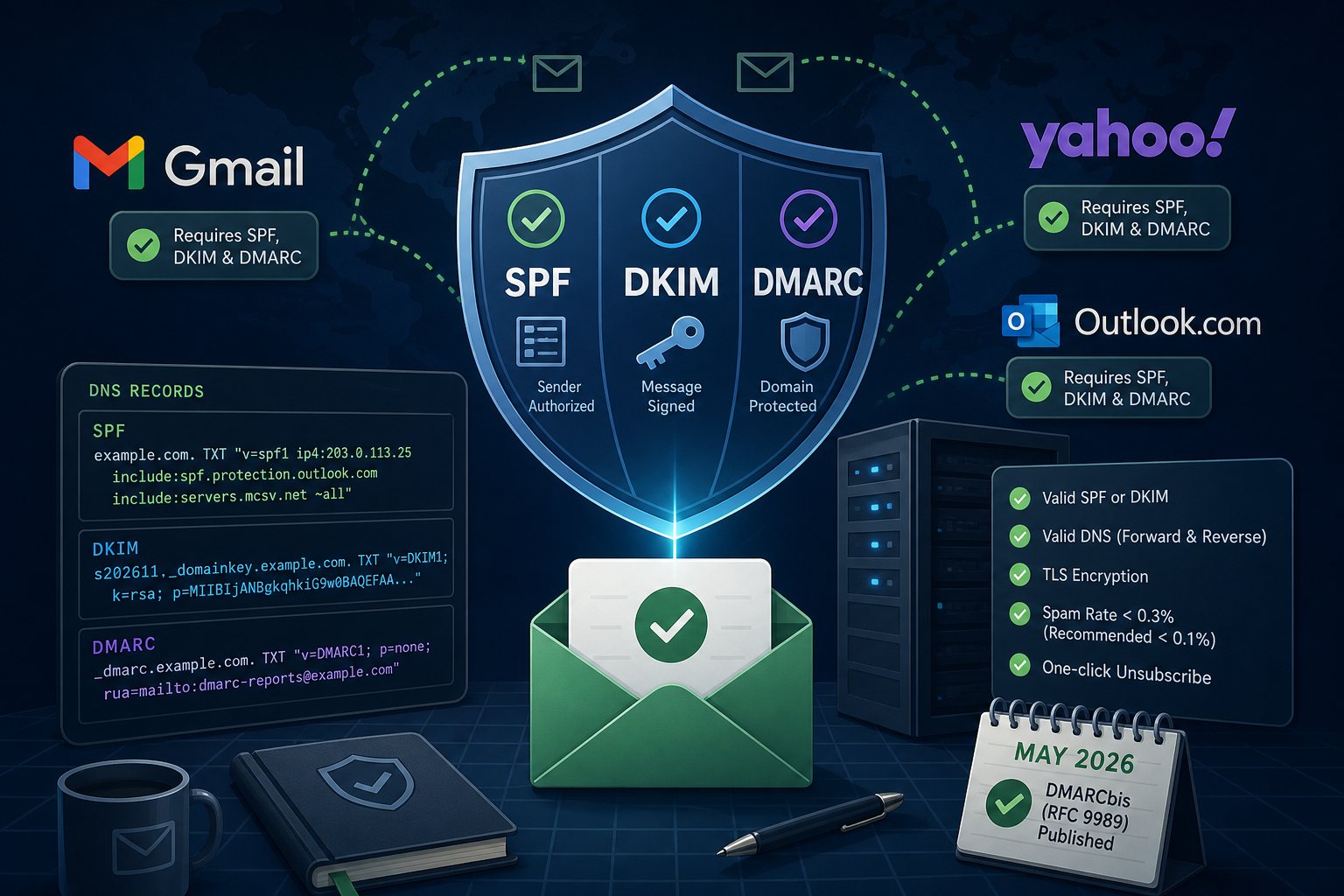
Gmail, Yahoo and Outlook.com all require SPF, DKIM and a DMARC record from any domain that sends more than 5,000 messages a day to their users. Smaller senders still need SPF or DKIM to pass, and in practice a domain without DMARC lands in spam more often and is easier to spoof. This guide covers building the three records, reading the reports, and moving DMARC to p=reject without blocking your own invoices, contact forms and newsletters. It also covers what changed in May 2026, when the IETF replaced the original DMARC specification.
Mailbox provider rules in effect today
Google's sender guidelines took effect February 1, 2024. Every sender needs SPF or DKIM, valid forward and reverse DNS on the sending IP, TLS, and a spam rate under 0.3% in Postmaster Tools (Google recommends staying under 0.1%). Bulk senders, defined as more than 5,000 messages a day to Gmail accounts, need both SPF and DKIM, a DMARC record (p=none is accepted), alignment between the From: domain and either the SPF or DKIM domain, and one-click unsubscribe on marketing mail. Google requires DKIM keys of at least 1024 bits and recommends 2048.
Yahoo's rules match Google's closely and add that unsubscribe requests must be honored within 2 days. Microsoft applied the same SPF, DKIM and DMARC requirements to high-volume senders to Outlook.com, Hotmail.com and Live.com starting May 5, 2025. Non-compliant mail goes to Junk for now. Microsoft has said rejection with error 550 5.7.515 will follow at a later date it has not announced.
Step 1: list every service that sends as your domain
Before touching DNS, write down every system that puts your domain in the From: line. For a typical small business that list includes:
- The mailbox provider (Microsoft 365, Google Workspace, or your own mail server)
- The web server, for WordPress contact forms, WooCommerce receipts and password resets
- A newsletter platform
- Accounting, invoicing, CRM, help desk and scheduling tools
- Copiers and scanners that email PDFs
Departments often sign up for these tools on their own, so ask around. Any sender missing from this list will start failing when DMARC reaches enforcement.
Step 2: build an SPF record under 10 DNS lookups
SPF is one TXT record at the domain apex listing who may send for it. A domain may have only one SPF record. Two records starting with v=spf1 cause a permanent error.
example.com. TXT "v=spf1 ip4:203.0.113.25 include:spf.protection.outlook.com include:servers.mcsv.net ~all"RFC 7208 limits SPF evaluation to 10 DNS lookups in total, counted across every nested include. The include, a, mx, ptr and exists mechanisms and the redirect modifier each count. ip4, ip6 and all do not. Going over the limit returns permerror, which receivers treat as an SPF failure. Check the current record and follow each include by hand:
dig +short TXT example.com | grep spf1
dig +short TXT spf.protection.outlook.com
To stay under the limit, replace a and mx with the server's literal ip4: address, drop includes for services you no longer use, and move bulk senders to a subdomain such as news.example.com with its own SPF record. Avoid third-party "flattening" that copies a provider's IP ranges into your record. When the provider changes its ranges, your mail fails and nobody is told.
End the record with ~all (softfail). Some receivers reject on -all before DMARC is evaluated, which drops forwarded mail that would have passed on DKIM. Once DMARC enforces policy, the difference between the two endings stops mattering for spoofing protection.
SPF checks the envelope sender (Return-Path), not the visible From: address. A newsletter platform that uses its own bounce domain will pass SPF for itself, which does nothing for your DMARC alignment. That is why DKIM matters more.
Step 3: publish DKIM keys for each sender
DKIM signs each message with a private key and publishes the public key in DNS under a selector. Microsoft 365, Google Workspace and most newsletter platforms generate the key and give you a CNAME or TXT record to add. Turn on signing in the admin panel after the record is live, and pick the option that signs with your own domain rather than the provider's default.
For your own Postfix server with OpenDKIM, generate a 2048-bit key with a dated selector:
opendkim-genkey -b 2048 -d example.com -s s202611 -D /etc/opendkim/keys/example.com/
cat /etc/opendkim/keys/example.com/s202611.txt
Publish the contents at s202611._domainkey.example.com. A 2048-bit key exceeds the 255-character limit for a single TXT string, so it must be split into several quoted strings in one record. Most DNS panels do this automatically. BIND zone files need it done by hand. Confirm the record resolves as one value:
dig +short TXT s202611._domainkey.example.comDated selectors make key rotation simple: publish the new selector, switch the signer, and remove the old record a week later.
Step 4: publish DMARC at p=none with aggregate reports
_dmarc.example.com. TXT "v=DMARC1; p=none; rua=mailto:dmarc-reports@example.com"With p=none receivers deliver mail normally but send daily XML aggregate reports to the rua address. Each report lists the sending IPs that used your domain, the message counts, and whether SPF and DKIM passed and aligned. Use a dedicated mailbox. A domain that sends a lot will receive dozens of reports a day. Free and paid parsers turn the XML into readable tables; the open source parsedmarc tool works if you prefer to keep reports in-house.
If the rua mailbox is on a different domain than the one being reported on, that domain must publish an authorization record such as example.com._report._dmarc.reportdomain.com TXT "v=DMARC1". Hosted report services set this up for you.
Step 5: fix alignment failures in the reports
Leave p=none in place for two to four weeks so monthly senders such as invoicing and payroll show up. Sort the report data by source IP and match each one to your inventory from step 1. Three groups appear:
- Your services passing with aligned DKIM. Nothing to do.
- Your services failing. Usually DKIM signs with the vendor's domain instead of yours, or the web server sends PHP
mail()from the server's hostname. Turn on custom-domain DKIM in the vendor's settings. For WordPress, send through an authenticated SMTP plugin using a real mailbox on your domain. - IPs you do not recognize. These are forwarders, mailing lists, or spoofers. Enforcement exists to stop the spoofers.
To test a single sender, send a message to a Gmail account, open it, choose Show original, and confirm SPF, DKIM and DMARC all show PASS. On any server, the Authentication-Results header should contain dmarc=pass with header.from=example.com.
Step 6: move to quarantine, then reject
When legitimate sources pass at or near 100% for two weeks, change the policy:
"v=DMARC1; p=quarantine; rua=mailto:dmarc-reports@example.com"Watch reports and help desk tickets for another two to four weeks, then move to p=reject. Set the record TTL to 3600 or lower during the change so you can back out quickly. Keep reading reports after reaching reject. A new vendor added without updating DNS will show up there first.
Domains that send no mail at all should publish a lockdown set so they cannot be spoofed:
parked.com.         TXT  "v=spf1 -all"
_dmarc.parked.com.  TXT  "v=DMARC1; p=reject"
parked.com.         MX   0 .
The last line is a null MX (RFC 7505), which tells other servers the domain accepts no mail.
RFC 9989 changes to DMARC tags
In May 2026 the IETF published DMARCbis as RFC 9989 (the protocol), RFC 9990 (aggregate reports) and RFC 9991 (failure reports). RFC 9989 is a Proposed Standard and obsoletes RFC 7489, the 2015 informational spec, along with RFC 9091. Records still begin with v=DMARC1, so existing records keep working. The changes that affect how you write the record:
pct,rfandriare retired. RFC 9989 receivers ignore them. Receivers still on RFC 7489 continue to honorpct.t=yis a new test flag. It asks receivers to apply one policy level lower (reject is treated as quarantine, quarantine as none) while reports continue. Older receivers ignore it.npsets policy for subdomains that do not exist in DNS, such asinvoice-payments.example.com. If it is absent,spapplies, thenp.- Receivers find the organizational domain by walking DNS instead of consulting the Public Suffix List.
The RFCs set no date for Google, Microsoft or Yahoo to switch their parsers, so for now a record using pct=25 or t=y will be read differently by different receivers. The safer approach during the transition is to skip both and step the p value directly, using the report data from steps 4 and 5 to decide when. Adding np=reject costs nothing and blocks a common phishing trick on domains already at enforcement.
On the mail servers we manage, we review a domain's aggregate reports before every DMARC policy change and after any new sending service is added.